Short answer: Cursor is the faster, more familiar choice: a VS Code-style editor built for precise, controlled AI help on day-to-day coding. Windsurf leans toward broader reasoning across a whole project, which suits larger codebases and architecture-level changes. Solo developers and small teams usually start with Cursor; teams working in big, complex repositories often prefer Windsurf. Both change quickly, so trial each on your own code before committing.
Table of Contents
We are firmly in the era of AI-assisted development, and two tools get much of the attention: Cursor and Windsurf. Both promise to transform the developer workflow, offer AI-powered coding assistance and cut time spent on repetitive tasks. Yet the experience each delivers is surprisingly different.
This comparison covers what each tool is best at so you can match it to how you and your team actually work. (Both products update frequently, so confirm current features and pricing on each vendor’s site.)
Cursor vs. Windsurf at a Glance
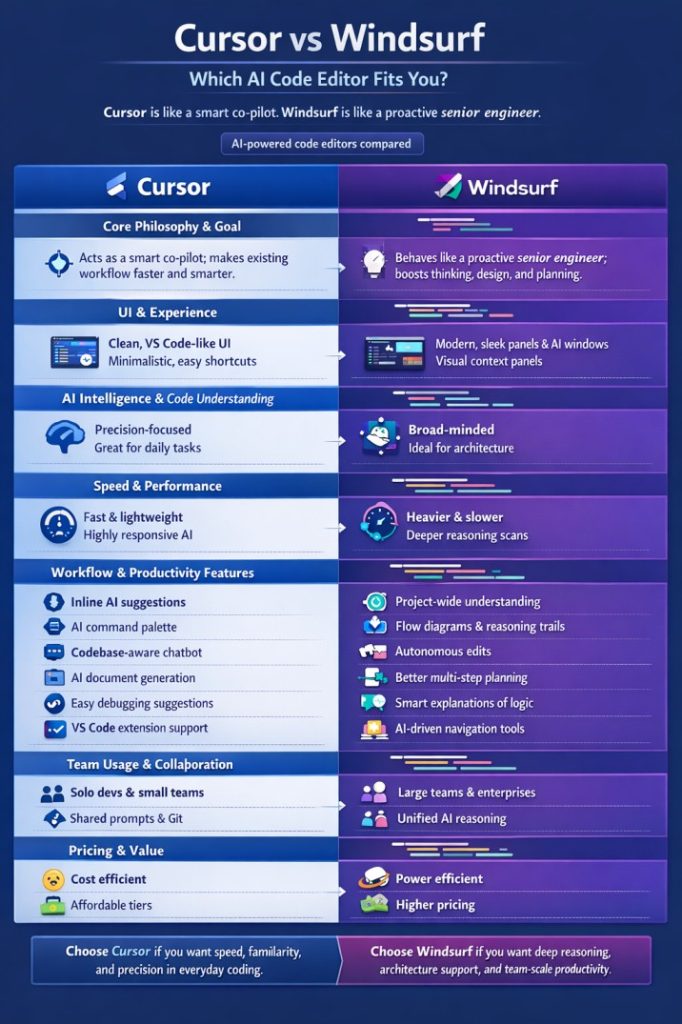
| Feature / aspect | Cursor | Windsurf |
|---|---|---|
| Core philosophy | A smart co-pilot | A proactive senior engineer |
| Primary goal | Make your existing workflow faster | Improve thinking, design and planning |
| User interface | Familiar, VS Code-like, near-zero learning curve | Modern interface with dedicated AI panels and visual context |
| AI focus | Precision and control on targeted instructions | Project-wide reasoning across multiple files |
| Ideal use cases | Daily coding, quick fixes, clean maintainable output | Architecture changes, large refactors, new modules |
| Speed | Fast and lightweight | Heavier on large codebases and multi-file tasks |
| Key features | Inline suggestions, AI command palette, codebase-aware chat, VS Code extension import | Project-wide understanding, flow diagrams, reasoning trails, autonomous edits, multistep planning |
| Best for | Solo developers, learners, small teams | Teams with complex repositories |
| Value | Cost-efficient for individuals | Power-oriented; check whether the extra capability justifies the cost for you |
What Is Cursor?
Cursor is an AI-first code editor built on the foundations of VS Code but with AI added across every layer. It is known for accurate code suggestions, AI-driven refactoring and the ability to chat with your codebase, and it gives developers already comfortable with VS Code a smooth transition. It positions itself as the next evolution of VS Code: everything familiar, with intelligence layered on top.
What Is Windsurf?
Windsurf takes a different direction. It goes beyond “an editor with AI” and tries to behave like an AI coding assistant that thinks about the whole project. It focuses on wide-angle understanding of larger repositories, real-time feedback and more autonomous problem-solving.
Cursor is like a smart co-pilot. Windsurf tries to behave more like a proactive senior engineer.
The comparison below is based on: user interface and experience, code understanding, speed and performance, workflow features, team usage, and pricing and value.
User Interface and Experience
Cursor has a clean, familiar, intuitive interface that closely resembles VS Code, so there is almost no learning curve. People are drawn to its minimalist design, easy-to-reach features and familiar shortcuts. Cursor adds AI without changing the environment developers already know.
Windsurf has a more distinctive interface with modern panels, built-in AI expansion windows and dedicated sections for suggestions and code flow, with more visual elements for context. For beginners it may feel new; for power users it can feel like a workspace designed for AI-driven coding.
Cursor is for a familiar workspace. Windsurf is for a modern UI with depth.
Code Understanding and AI Intelligence
Cursor is known for accurate snippets, step-by-step bug fixing and refactoring that follows targeted instructions closely. It tends to stay grounded and not overthink, which suits daily coding tasks, quick fixes and clean, maintainable output.
Windsurf feels stronger when you’re thinking project-wide. It handles complex repository structures, reasons across multiple files, suggests workflow decisions and copes better with ambiguous instructions, which helps with architecture changes, large refactors and designing new modules.
Cursor is for precision and stability. Windsurf is for reasoning and architecture.
Speed and Performance
Cursor tends to run smoothly, even on mid-range machines, with responsive AI thanks to optimized context handling.
Windsurf can feel heavier and slower at times, especially when scanning large codebases, switching models or doing multi-file reasoning. The trade-off is deeper reasoning.
Cursor is for speed. Windsurf is for processing large projects.
Workflow and Productivity Features
Cursor offers inline AI suggestions, an AI command palette, a codebase-aware chatbot, AI documentation generation, debugging suggestions and easy import of VS Code extensions. It focuses on making your existing workflow smarter.
Windsurf offers project-wide understanding, flow diagrams and AI reasoning trails, autonomous edits, multistep planning, smart explanations of code logic and AI-driven navigation. It focuses on boosting thinking, not just typing.
Team Usage and Collaboration
Cursor shines for individuals and small teams, collaborating through shared prompts, shared generated code and Git-integrated workflows.
Windsurf is a better fit for teams with complex repositories, large collaborative development and situations that benefit from unified AI reasoning across team members.
Pricing and Value
Both tools offer free and paid tiers, and both have changed their plans and limits several times, so check current pricing before deciding. As a general pattern, Cursor is often the easier starting point for individuals and students, while Windsurf’s more team-oriented capabilities may justify a higher spend if you use them. The better question than “which is cheaper” is which one saves your team more hours per month.
Which Should You Choose?
| If you are… | Start with |
|---|---|
| A solo developer or learner who wants faster daily coding | Cursor |
| Already comfortable in VS Code and want minimal change | Cursor |
| Working in a large, multi-service repository | Windsurf |
| Planning big refactors or new architecture | Windsurf |
| A team that wants to compare on real work before standardizing | Trial both on the same task |
There’s also a newer, agent-first option. If you want to see how a multi-agent environment compares, read our review of Google’s Antigravity IDE vs. Cursor and Windsurf, or our head-to-head Google Anti-Gravity vs. Cursor.
How to Trial Both Fairly
- Pick one real task from your backlog, such as fixing a bug and adding a small feature.
- Do the same task in both tools with a similar prompt.
- Measure time to a working result, number of corrections needed, and how much you trusted the output.
- Review the code the same way you’d review a colleague’s, since AI-generated changes still need human review.
- Check data handling if you work on private code: what is sent to external services and under what terms.
Choosing and rolling out AI development tools is part of a wider engineering strategy; our guide to the software development services every business needs covers the bigger picture.
FAQ
What is the main difference between Cursor and Windsurf?
Cursor is a familiar, VS Code-style editor focused on precise, controlled AI help for everyday coding. Windsurf aims to reason across a whole project, which suits larger codebases and architecture-level changes.
Is Cursor or Windsurf better for beginners?
Cursor is usually easier for beginners and anyone used to VS Code, since the interface is familiar and the learning curve is small. Windsurf can feel newer but offers more visual context for power users.
Which is better for large codebases, Cursor or Windsurf?
Windsurf is generally positioned for large, complex repositories because of its project-wide reasoning, though it can be heavier and slower on big scans. Cursor is faster and lighter for targeted edits.
Can I use my VS Code extensions in Cursor?
Cursor is built on VS Code foundations and supports importing VS Code extensions and settings, which is a large part of why the transition is easy for existing VS Code users.
Should I switch to Google Antigravity instead?
Not necessarily. Antigravity is a newer, agent-first environment that is more experimental. Many teams keep an established editor like Cursor or Windsurf for daily work and pilot Antigravity as a secondary tool.
Cursor and Windsurf are both powerful AI-integrated development environments. Which one is best depends on your needs, your codebase and your team, and each does its own thing well. If you’re evaluating AI development tooling for a team, book a consultation and we’ll help you plan a sensible pilot.